The Take Away
A healthy respect for publicly exposed services is still warranted - but fear is no longer a blocker. By leaning on tools that abstract networking and security complexity, I reached a point where hosting public services feels manageable rather than reckless. This post explains how I arrived at that architecture and why it finally unlocked public hosting for me.
My Background and Motivation
I’ve wanted to host services for friends and family since I was a kid. Maybe one of my first “networking” memories was high school when I invited 15 other boys to take over my parents’ house for the night. Ethernet cords stretched the length of the house, trailing down hallways, linking rooms together for the night. We had 16 players on 4 Xboxes playing Halo: Combat Evolved. It was glorious mayhem.
In my adult life I’ve had an irrational fear of publicly exposed services. The fear isn’t irrational, but irrational that it prevented me from trying. I knew that I didn’t know a lot about networking so I knew that I would need tooling that abstracted the lower level networking. Our apartment is stuck behind an ISP router because our ISP uses some kind of software to boost our bandwidth up to our subscribed level. I don’t have control over this router, so I can’t simply expose a port from the home router.
My homelab was a simple Proxmox server with a Jellyfin LXC. Very simple, but being local only I didn’t think it would be useful to add more services until I could provide remote access.
My New Homelab Architecture
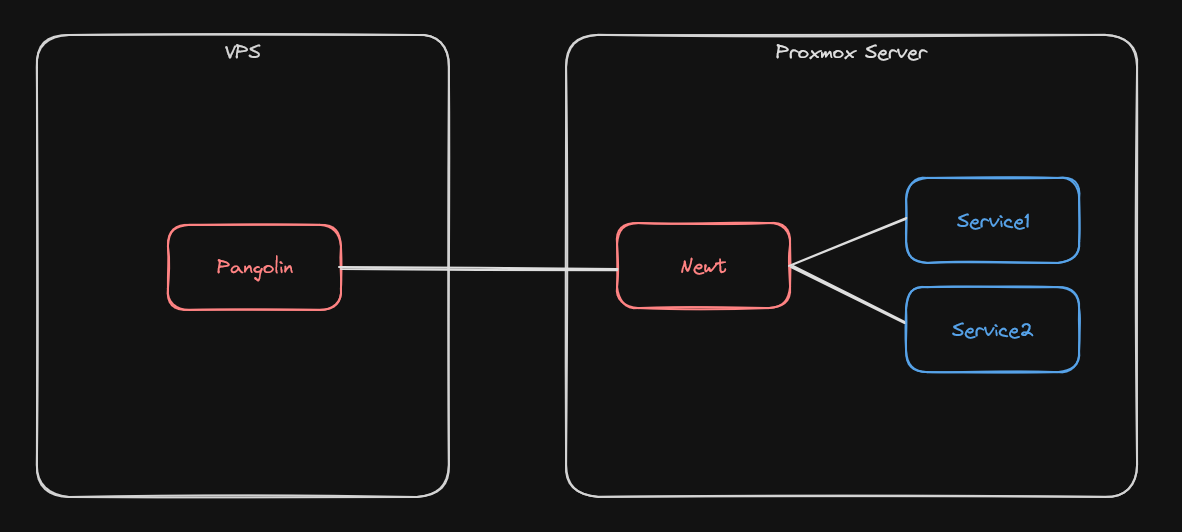 A VPS running Pangolin routes public requests into my homelab’s Proxmox server.
- Pangolin - “Open source Cloudflare Tunnels”, Installed on an Ubuntu VPS.
- Newt - A Debian LXC with Newt installed on it.
- Services 1 & 2 - Other LXCs running on my proxmox server.
- Traefik - An open source reverse proxy, installed as part of Pangolin
- Crowdsec - A crowd sourced fail2ban, installed as part of Pangolin
Pangolin is a self-hosted tool that securely exposes homelab services to the public internet by orchestrating wireguard tunnels and a reverse proxy (using Traefik) so you don’t have to wire everything together manually. This means I can connect to my services via https with authentication handled by Pangolin.
The Newt app is Pangolin’s Wireguard peer. The tunnel from Pangolin into the Newt client allows the VPS to route traffic from the public internet into my homelab services. The same way that I can use local IPs to access my homelab before, Pangolin can route public traffic into a local IP that newt has access to.
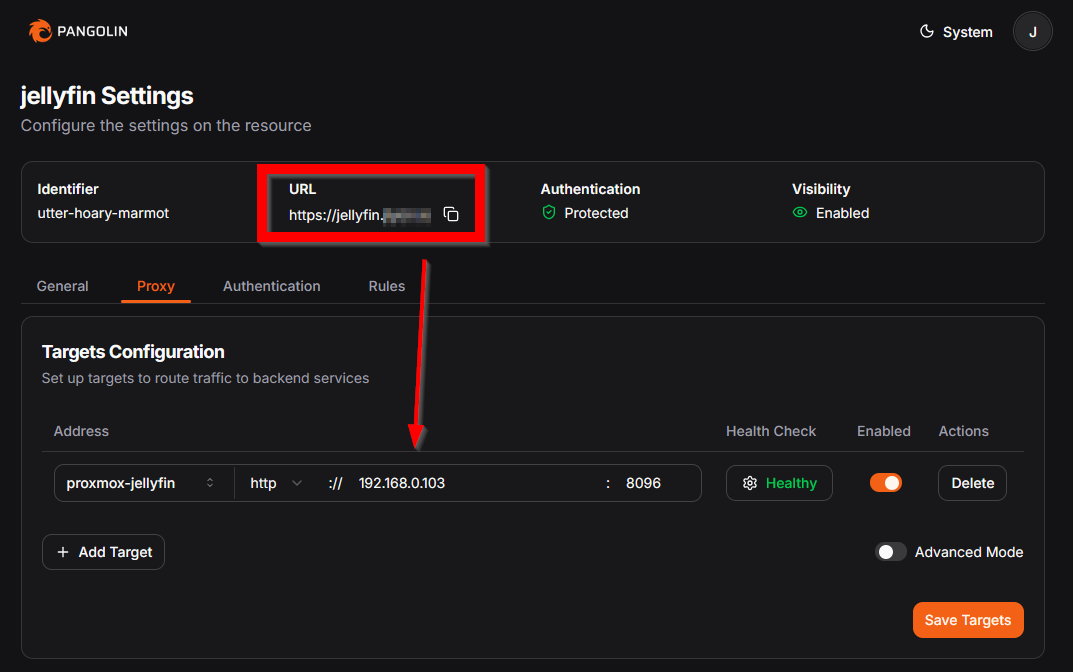 Here’s how easy it is to route a public URL to an IP inside my homelab using the Pangolin Web UI.
Tools I passed on
- Tailscale - I didn’t want to install Tailscale clients on every device that uses my services.
- Cloudflare Tunnels - While super easy to setup, I did not choose it because streaming media is against their TOS.
- Wireguard - On my initial read of this, it sounded like Tailscale but hard mode.
Conclusion
This setup didn’t make me an expert in networking, and it didn’t need to. What it changed was my willingness to host services publicly. By offloading the sharp edges to tools designed for this exact problem, public exposure stopped feeling like a gamble and started feeling intentional.
I’m only running a single service today, but that’s no longer a constraint imposed by fear or infrastructure. The architecture scales when I’m ready, and the controls I’m not using yet—users, RBAC—are there when the problem becomes social instead of technical.
The real unlock wasn’t any single tool, but realizing that “safe enough” can be achieved without mastering every layer. That’s why this works for me.
If a how-to guide interests you, let me know.
Links
- Pangolin, https://docs.pangolin.net/
- Traefik, https://doc.traefik.io/traefik/
- Wireguard, https://www.wireguard.com/
- Crowdsec, https://www.crowdsec.net/
- Proxmox, https://www.proxmox.com/en/